3D USA Map 4th of July Cut Files
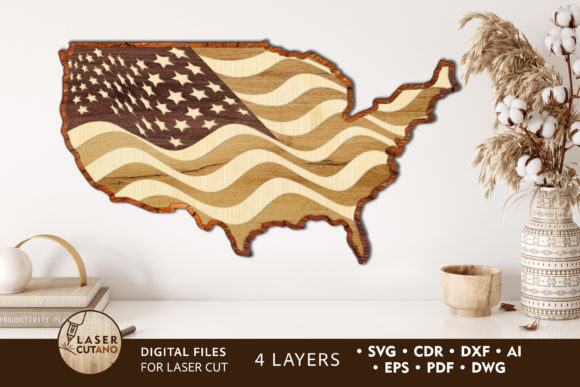
If you are looking to add a patriotic touch to your office, classroom, or home without spending a fortune on custom framing, the 3D USA Map 4th of July Cut Files offer a versatile solution. This multilayer layout is not just a digital image; it is a structured blueprint designed for laser cutters, CNC routers, and other precision cutting machines. Whether you are an experienced woodworker or a beginner eager to try your hand at 3D assembly, this design provides a creative foundation that transforms flat materials into a dimensional piece of art.
The appeal lies in its flexibility. You can choose from vintage aesthetics, vibrant contemporary colors, or abstract interpretations to match your specific decor theme. However, while the concept is simple, the execution requires attention to detail. Many creators rush through the setup process, only to find their finished product lacks stability or visual impact. To ensure your project succeeds, it is essential to understand the technical specifications and common pitfalls associated with these files.
Understanding the Multilayer Structure
At the core of this product is a multilayer layout specifically prepared for cutting. The final assembled product measures approximately 16.7 x 30 inches, creating a substantial statement piece. The design consists of four distinct layers that must be glued together to achieve the desired depth. Unlike standard vector files where all elements sit on a single plane, this file separates the map into components that create a 3D effect when stacked.
A critical mistake beginners often make is ignoring the recommended material thickness. For wood-based projects like plywood or MDF, the ideal thickness ranges from 3 mm to 6 mm (approximately 1/8 inch to 1/4 inch). If you select material that is too thin, the structural integrity of the layers may fail during gluing, causing the map to warp or separate. Conversely, using material that is too thick can make the individual layers difficult to align perfectly, resulting in a jagged appearance rather than a smooth, cohesive map.
Selecting the Right Materials
While wood is a popular choice, the file supports a wide variety of substrates including acrylic, plexiglas, metal, cardboard, and paper. Each material brings a different aesthetic and set of challenges:
- Plywood and MDF: These provide a classic, warm look but require sanding between layers if you plan to paint them for a uniform finish.
- Acrylic and Plexiglas: These materials offer a modern, translucent glow, especially effective if backlit. However, they require specific laser settings to avoid melting edges.
- Metal: Using sheet metal creates a durable, industrial look but demands heavy-duty machinery like fiber lasers or waterjets.
When choosing your material, consider the environment where the map will hang. A classroom might benefit from lightweight cardboard or MDF for safety, while a professional office could justify the cost of polished metal or high-grade acrylic.
Common Pitfalls in Design and Assembly
Even with high-quality files, poor results often stem from user error during the scaling or preparation phase. One of the most frequent issues involves resizing the design. You can easily increase the size of the 3D USA Map 4th of July Cut Files to fit a large wall, but reducing the design poses significant risks.
When you shrink the dimensions, thin elements within the map layers become disproportionately fragile. A line that looks perfect at full scale might break entirely or fail to cut cleanly when reduced by 50%. Always check the thinnest details in your preview before sending the job to the machine. If the lines are too fine for your chosen material thickness, it is better to keep the original size or slightly enlarge it rather than risk a broken component.
Another overlooked step is the finishing process. The instructions recommend painting before gluing. Skipping this step leads to messy seams and uneven color coverage. Once the layers are bonded, touching up paint becomes nearly impossible without damaging the 3D structure. Take the time to prime and paint each layer individually, allowing ample drying time before assembly. This ensures a professional, factory-like finish that elevates the entire project.
File Formats and Preparation
Upon payment, you receive a comprehensive .zip file containing formats compatible with various software: .AI, .SVG, .DXF, .DWG, .CDR, .EPS, and .PDF. While having multiple options is convenient, it also requires organization. Before opening any file, unzip the folder completely. Attempting to edit files directly from a compressed archive can lead to corrupted paths or missing assets.
Different machines prefer different formats. For instance, Glowforge users typically work best with .SVG or .DXF files, while traditional CNC operators might prefer .DWG or .AI. Ensure you open the correct version in your preferred software to maintain layer integrity. If you encounter issues with imported layers merging unexpectedly, check your software's import settings to ensure "preserve layers" is enabled.
Optimizing Your Workflow
To maximize efficiency, organize your workspace before starting the cut. Lay out all four layers in order and verify that the orientation matches your intended assembly. It is helpful to label the back of each cut piece with a number corresponding to its layer position. This prevents confusion during the gluing stage, where misalignment can ruin the 3D perspective.
When assembling, use a strong adhesive suitable for your material. For wood, wood glue works well, but for acrylic, a solvent weld or epoxy is necessary. Apply the glue sparingly to avoid oozing out from the sides, which can mar the clean lines of the map. Press the layers firmly together and allow sufficient curing time before hanging the final piece.
Why Choose This Design for Your Project?
The 3D USA Map 4th of July Cut Files stand out because they bridge the gap between digital creativity and physical craftsmanship. They are not limited to just one holiday; while perfect for the Fourth of July, the neutral base allows for customization year-round. Educators can use them to teach geography, entrepreneurs can display them in reception areas, and hobbyists can enjoy the satisfaction of building something tangible.
By understanding the technical requirements—such as material thickness, layer count, and the importance of pre-painting—you avoid costly mistakes and ensure a high-quality result. Whether you are producing a single custom gift or manufacturing units for a small business, this multilayer layout provides the reliability and creativity needed to succeed. Take the time to review the files, select the right materials, and follow the assembly guidelines, and you will end up with a stunning 3D representation of the United States that impresses everyone who sees it.